This blog is now obsolete. Go to scott.arbeitman.id.au for all new content.

Showing posts with label microsoft. Show all posts
1

Tools of the Trade

| Wednesday, April 1, 2009

When at work, many of us are using Windows when are hearts might be elsewhere. As I wind down work with my current employer, I'm taking not of the tools I installed over the past 18 months which has significantly boosted my productivity. Here they are in no particular order.

Confluence

An enterprise wiki developed by a very switched on Australia company, company has been a great tool to share knowledge. Since we adopted it, I don't believe there has been a single file stored on the shared drive. Everything in Confluence is searchable, taggable and can be edited without opening Word.

Mingle

I've blogged about Mingle before, but its worth repeating: Mingle is a great tool. Its easy to use and does a very small amount of things reasonably well. Unfortunately, it was introduced into a team which wasn't very disciplined with project management (and our one project manager left several months ago) or time tracking so it didn't transform the way we work as much as I would have liked. However, if anything was going to work, Mingle was it.

ObjectDock Plus

ObjectDock is a Windows utility which mimics the dock on Mac OS X. Aside from the nice looks (it does suprisingly well, even with very low quality icons), it definitely increases your productivity. I have basically eliminated using the Start menu and can quickly open documents with specific applications just by dragging them to the dock. I use the Plus version and it money worth spending. I am able to move my system tray to the top of the screen (like the Mac menu bar) which makes a bigger difference than you would otherwise expect.

Google Chrome

The early adopter that I am, I quickly tried out Google Chrome when it was released. It turns out the speed is the killer browser feature. I've strayed to other browsers on occasion (Safari 4 Beta isn't bad) but I keep coming back to the Chrome. Lots of you out there rely on Firefox and her extensions. I hear you, but that's just not me.

Excel 2007

Nothing has improved my ability to analyse data more than Excel 2007. It seems to crash less than most Office applications, and the way it handles pivot tables is surely the way nature intended. The is extended to how it works with OLAP cubes; Excel is definitely my preferred OLAP client. For added value, impress your boss by using the data mining plug-in to do some incredibly useful tasks.

E

E is a text editor for Windows based on Textmate for Mac. I still prefer Textmate, but E comes close. I was never able to get the Cygwin integration working, but then again, I'm not as big a Unix geek as some. Still, e is a great lightweight text editor that gets out of your way, quickly opens files as text (even if they're not) and is always a right click away.

Jing

Jing is a very lightweight tool that allows you to quickly take screenshots or screencasts. It is free and has almost no features, but I wouldn't use anything else. It sits on the edge of your screen as a translucent sun, waiting for you to click it. When you do, you decide, image or movie, and off you go. You can't edit videos, but you can draw, highlight and annotate screenshots. Its always available, doesn't consume many resources and "just works". Combining Jing and Confluence can create a very simple but powerful platform to document your software systems and create how-to guides for your users.

This is an image taken using Jing that brings it all together: Chrome + Confluence + Jing + ObjectDock.

image
0

Microsoft Has Technical Support Too

| Friday, January 16, 2009
I'm convinced that Microsoft indirectly employees thousands of help desk employees throughout the world. These are the brave soldiers troubleshooting problems with Windows and Office in most corporate offices facing angry office lemmings just trying to do their job. In a  way, I'm grateful to Microsoft; my first real job lasted so long primarily because of all the bugs in Windows and Office and the fact that most Windows applications tend to conflict with each other, not cleanly uninstall themselves and consume system resources inversely proportional to the utility they offer (I'm looking at you, Outlook).

One thing I never did though, was call up Microsoft Technical Support. We just accept that software will break and crash and hold Microsoft to zero account. Instead, the world's help desk employees can go through various troubleshooting steps which often involve either reinstalling the offending application or the entire operating system (a so-called rebuild). 

Why the reluctance? I suppose this can be expensive (I've been told that in one company, they treat the hours on the phone with Microsoft like "gold"). This assumes, of course, that the idle employee waiting for someone to troubleshoot their computer is a better alternative. Sometimes, companies can be so misguided. 

It also assumes that will actually be charged by Microsoft. From what I hear, Microsoft is fairly liberal in waiving charges for things that were its fault.

So I'm putting the challenge out there to the world's help desk workers. Next time someone brings you a problem that you can't easily solve (Outlook losing calendar invites, for example) insist on calling Microsoft before running through the ridiculous step of uninstalling the application or worse. Help desk should be for helping with the day-to-day operations of a computer, not for rectifying the arrogance of a monopolistic software vendor.
0

Dynamics CRM 4: Discovering the SQL behind an "Advanced Find"

| Wednesday, November 26, 2008

Have you ever wanted to know exactly what SQL was generated by the advanced find? This question might just be because of shear curiosity, but the results of this query by also be the starting point for most sophisticated reports using SQL Server Reporting Services.

The process is straightforward. All you need is Dynamics CRM 4 and Excel 2007 (2003 should work similarly). [See update below for doing this without Excel]

Perform an advanced find  
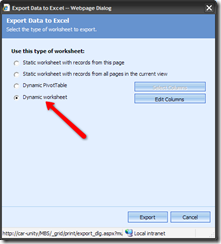
Run the query, and export the results to Excel. Make sure you select "Dynamic Worksheet" although I'm pretty sure "Dynamic Pivot Table" will work image
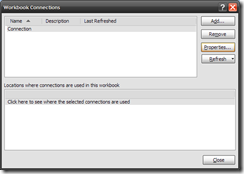
In Excel, once you have data displayed (which might mean enabling data connections), go to the Data tab, and click "Connections" image
You should have a single connection called "Connection". Look the properties for this connection. image
Go to the definition tab. The command text contains the SQL behind the advanced find. image

This approach works with SharePoint lists as well. Using this technique with SharePoint list data helps you quickly determine the GUID of the list and the view you are using.

Update: Dynamics exports the data as an XML file, not a binary XSL file. Therefore, you can simply open the downloaded "Excel" file with a standard text editor and view the SQL within. 

3

Crashing Outlook Saga

| Monday, November 24, 2008

My love affair with Microsoft continues. For the past few months, Outlook 2007 crashes constantly, severely limiting my productivity. Last week, I asked someone from our help desk to look at the problem again. They did the usual:

  • uninstall/reinstall
  • clean my registry

but without any success.

Today, it appears that one of Microsoft's background services detected that there was a problem with outlook (500 crashes later), and decided to try to determine, once and for all, how I could fix my Outlook. (I should note by the way, that while the diagnostic scan was running, Outlook crashed 3 more times).

Here is what the scan discovered:

image 

Clicking "continue" took me to a worthless web page which I will now summarize: we don't know what the problem is and we don't have any solutions.

Can they possibly waste any more of my time?

3

Reflections on Marketing Class: Using Apple as a Case Study in Marketing Channels

| Monday, October 27, 2008

Today in my marketing class at Melbourne Business School, we examined distribution channels vis-à-vis marketing. Not surprising, we examined the distribution of music, tracing it from a technological standpoint (vinyl to MP3) and its channels (independent shops to iTunes).

The lecturer's main point with regards to Apple's success was the control over the hardware, software, and content of their "ecosystem" which allows them to control the channels of music distribution. While I don't disagree with Apple's dominant position, I take issue with some of comments and perceptions with regard to Apple's technology approach that were made in passing.

Primarily, the point was made that Apple is successful because their system is "closed", as compared with Microsoft that must struggle to handle software from a multitude of vendors. In fact, the underlying assumption, it seems, was that you simply could not develop any custom software for a Mac. Of course, this is simply not true.

Let me briefly explore the development options for both systems.

Unlike Windows where developers need to spend hundreds of dollars on software development products like Visual Studio, all Macs come bundled with X-Code, their development environment for building Mac software. One could argue that this alone makes it easier for a developer to create software for a Mac compared to a Windows PC.

Of course, it doesn't stop there. There was many who would argue that the Mac development environment is superior to Windows in other respects. The Cocoa framework seems to be a very elegant paradigm for developing applications, and Mac applications can often be created without writing any code. This doesn't mean anyone can create software for a Mac, but it does mean that more software can be created faster with fewer defects. (As an aside, Automator for Mac does mean that some tasks can be automated by someone without any development knowledge, and there simply isn't anything like it on Windows).

Steve Jobs understood the benefits of having a superior development environment (as well as other marketing principles such as segmentation, targeting and positioning) as demonstrated on this now-famous video from when he was at Next:

This philosophy was brought to Apple when they purchased Next, and brought Jobs back into the fold. Mac OS X is based on Next technology.

In class, it was also mentioned that the iPhone is Apple's first device which supports third-party applications. This, too, is not true (although it is the first iPod which can supports third-party applications). The Newton supported application development,although I don't know if it was a good environment or not.

Finally, Apple has success not just on Macs, but also on PCs with their iTunes software, showing they can success even when they don't control the hardware. Microsoft, too, has had success on Macs. Internet Explorer was highly regarded, and Office for Mac is sometimes regarded as superior to its Windows counterpart.

In summary, I'm making the point that Apple computers and devices are not closed systems; they do support software development, and provide a robust environment at that. Steve Jobs not doubt continues to realize the contribution that software developers make to the value proposition of a computing platform.

0

Microsoft versus Thoughtworks. SharePoint versus Mingle

| Wednesday, February 20, 2008
This past week has been dominated by our portal project. SharePoint is our platform of choice for the portal, and Mingle is the documentation and project management tool that I'm using for this project. As a business analyst (my job title), it makes sense to use tools like SharePoint where I can address business requirements without relying on developers; I can often gather requirements and configure the system in real time if required. This is a tremendous asset.

So yes, SharePoint is a nice tool insofar as it satisfies the 80-20 rule for off-the-shelf-software: 80% of what you need is available out of the box, and 20% is missing and requires customization. Luckily, it seems SharePoint doesn't suck too much at customization, so we are not stuck trying to reinvent the wheel and hack into areas where we shouldn't. Still, there isn't much of an open-source community around this project as I would like to see, and it's difficult to get a grasp of what is an easy customization, and what is nearly impossible. The amount of blog posting from non-Microsoft employees regarding SharePoint, for example, is lacking.

Aside from poor community support and documentation, the other gripe I have is that finding out how do the 80% out-of-the-box functionality very time consuming. SharePoint doesn't actually do much, but finding out what it does and how to do it is quite challenging. Things that would seem natural to be able to do (reference the Now() function in calculated columns, have global lists, changing the link to text for document library items) are nearly impossible. Since you can't easily determine what's possible and the system is so unintuitive, a lot of time is spent searching for options which do not exist but presumably should.

Contrast this with Mingle.

Granted, Mingle does a lot less than SharePoint, although one could argue that there is much overlap. But the learning curve is negligible and the user interface, despite feeling less like a real desktop application than SharePoint, is actually a pleasure to use. Mingles features are easy to find and configure, the documentation and screencasts are well though-out so it's easy to see what Mingle can -- and more importantly -- cannot do, so little time is wasted searching for ways to do the impossible. Mingle comes with meaningful templates that actually show off "advanced" features like card transitions, graphing, and well constructed card properties.

(As a side point, the Mingle concept of "cards" is really not all the different from the SharePoint concept of lists. The both offer custom, typed columns and they both offer different views.)

There are a few lessons here for me:
  • ship your application with meaningful out-of-the-box samples. Even better if some sample content could actually be applied to whatever project you're about to begin. (The SharePoint logo as an image web part is not really helpful)
  • web applications should not try to feel like desktop applications; the should feel like web applications. This way, when I want to move the location of something on a page, I'll be pleasantly surprised that it drags instead of frustrated I have to click the "Move Up" button on a "toolbar" 30 times
  • product marketing pages should actually show how to use the product, and relevant scenarios. Otherwise, I can't get started quickly, and I'm not sure what's possible.
Are you using Mingle or SharePoint (or both)? I'd love to hear about your experiences.