This blog is now obsolete. Go to scott.arbeitman.id.au for all new content.

Showing posts with label technology. Show all posts
1

Employee-Owned IT

| Wednesday, December 16, 2009

Today's Age talks about 10 business IT trends for 2010. Number is "Employee-owned IT":

Traditionally, IT departments decide what kind of computers and software employees use and they take responsibility for all maintenance chores. Younger workers, however, have grown up choosing their own computers and applications and want to keep their personalised computing styles. Enter employee-owned IT, which sees workers bringing their own computers to work so that IT can lock them down with virtualisation or multiple operating systems that deliver security. IT departments save as maintenance devolves to computer vendors, while employees swear they are more productive using a machine of their choice.

This approach can help close the technology gap I blogged about a few weeks ago. But by imposing constraints on my personal computer, you are actually making my personal computing more like a corporate experience rather then vice-versa.

I think there is a place for computers to be "locked down," However, that does not give license to restrict access to specific sites just because they are "productivity killers" or a blanket restriction on installing software. There needs to be a balance.

One way to achieve that is to have two competing IT groups in your organisation. One that restricts what you can do with your computer (you already have one of those) and one that proactively installs software and coaches you to work more effectively with IT.

If employeed-owned IT helps us get there, I'm all for it.


1

On Psychologists and Technologists

| Monday, November 2, 2009

In my Business Strategy class on Saturday morning (!), I asked a seemingly harmless question about why economies of scale did not apply to the now defunct MBS-Melbourne Uni merger. The question apparently struck a nerve with both the lecturer and some of the students. One of the students expressed something I have long felt, not just about the merger, but during my time working at the business school.

We have great faculty in the leading edge of their field. Often, they are engaged in helping real organisations improve their business during the day while lecturing at night and somehow managing to publish their research. Why, then, did the merger fiasco play out the way it did given the business expertise within the school? Why weren't leasons from the Business Strategy subject, for example, applied?

This was the most frustrating thing about working at MBS in general. There was consistent pattern: what I had learned in class was not being applied in the business of the business school. In fact, to the best of my knowledge, the school made very little attempt to integrate the knowledge of the faculty with anything practical.

The lecturer in my class described the general phenomenon whereby those who are best equipped to fix a problem neglect their own problems to focus on those of others This is know as the problem of the problem of the cobbler's children.

This is, of course, no excuse. It's not an explanation. And it isn't generalizable.

Let us consider a counter-example very near to me. Those who work in the IT industry as technologists (as distinct from those in other functions such as project managers) almost always reserve the very best hardware and software for themselves.

Think about it. At a technical conference (say Java), a majority of participants are using Macs (widely considered to be the superior platform). Developers are usually early adopters of the latest and greatest. My peers were the first to use GMail and, more recently, Google Wave. We were the first to set up wireless networks at home. We do things with our laptops that are difficult and complicated, but that help enrich out lives through technology. We have bigger monitors.

Do you really think Sergey Brin, founder of Google, is really using Windows XP? Do you think Joel Spolsky is using Outlook? I don't.

Unfortunately, as I previously wrote, organisations are less likely to adopt the IT practices of their staff, much to their detriment. They are missing the opportunity to make themselves as productive as their most productive employees.

So what separates technology workers from some of the other professions? I'm not sure.

First, my underlying premise may be false. Are IT workers really different from those in other professions? Certainly my perception is that they are but I don't have the research to back this up.

Part of it may be that IT workers genuinely enjoy their field more than others. It is certainly not uncommon to use my leisure time learning new technologies and new ways of doing things; much more so than other professions who might attend a conference or two, and only when paid for by their employer.

Another explanation could be pragmatism. Is a psychologist really going to give himself therapy? Is a doctor really more inclined to diet and exercise? Installing a new Twitter client or learning a new programming language certainly seem much more attainable goals, and the costs are generally small.

The main thing I can conclude is that if you are in a profession or work for a company that doesn't implement the skills you market, your outcome is probably not going to be as successful as you want. That, and technologists probably enjoy their field, on average, more than others. Join us!


1

Great Post About IT Restrictions in the Workplace

| Saturday, September 5, 2009

My friend, former coworkers and MBS alum has a thoughtful post following on some of the themes from a previous post. In it, he sites a great Slate article which argues for a loosening of IT restrictions:

…The restrictions infantilize workers—they foster resentment, reduce morale, lock people into inefficient routines, and, worst of all, they kill our incentives to work productively. In the information age, most companies’ success depends entirely on the creativity and drive of their workers. IT restrictions are corrosive to that creativity—they keep everyone under the thumb of people who have no idea which tools we need to do our jobs but who are charged with deciding anyway.

Ameel thoughtfully concludes that IT departments would be wise to add their own in-house analysts to match IT tools available to those in the company who might need to use them, lest services be blocked somewhat arbitrarily.

What is often missing is…:

  • In-house IT Consulting: the people who liaise directly with different parts of the business and use the latest technologies to improve the way those people work
Without that fourth part, IT departments have a hard time keeping up with what people in the organization believe are the most effective and efficient ways of doing their work. They also don’t keep up with the latest technological solutions for various business problems.

I couldn't agree more. I'd like to think that my former team in Melbourne Business School performed that function admirably. Often, we would just connect business users with simple off-the-shelf services that would dramatically effect productivity. Three examples would be Confluence, Google Groups, and Google Desktop, but there are many more.


0

Minor Thesis: Inference of Enumerated Types In Java

| Wednesday, September 2, 2009

If you're not from the Computer Science discipline, you can safely skip this post.

After doing some hard drive spring-cleaning, I came across the Latex files relating to my master's thesis at the University of Melbourne. Although I undertook a Masters of Software Systems Engineering by coursework, I was able to write a minor thesis in lieu of 2 subjects.

At the time, compilers and type analysis were of particular interest to me, having thoroughly enjoyed the Compiler Design class at McGill several months earlier. In that class, we wrote a compiler for a toy language called WIG and added features to an existing compiler for the JOOS language, a subset of Java. We used the SableCC lexer/parser, an open source compiler compiler written by another McGill student. I remember staying up several late nights before the project was due. It was great fun.

The forthcoming language enhancements in Java 5 provided a good platform for static code analysis and enhancement; a similar paper inferred generic types, for example. I had also competed a survey of programming languages class which compared functional, logic and imperative language (Haskell, Prolog and Java respectively) taught by Peter Schachte. Peter was kind enough to supervise.

With that background, I thought I would post the PDF of the paper I wrote. I'm not sure if this is the exact paper I submitted, and it certainly includes some typos and, having reread it recently, I can see that my writing needed a bit of work. It is very difficult to decipher some of the content. I suspect I used the most complex symbols and wording possible, but I had slaved through reading similar papers during my research so I must of thought that was the best way to do things.

Without any further ado, please find my paper, Inference of Enumerated Types In Java in PDF format. Note that this paper has not been published in any journal, and has had minimal peer review. It is presented for educational purposes only. However, if you'd like to chat about it, do get in touch.


0

Microsoft and Google Compete To Supply E-mail to America's Universities

| Tuesday, August 18, 2009

From Time:

Students have been howling that school e-mail accounts are too small to handle their daily deluge of mail and attachments.

This is the same technology gap I blogged about the other day. Most universities are taking note:

In the 2008 national Campus Computing Project (CCP) survey, 42% of schools reported that they had already migrated or were about to migrate to an outsourced student e-mail service. Another 28% said they were considering switching.

This can only translate into corporate adoption of similar practices. Google hopes this leads to mainstream (read: corporate) adoption of web e-mail.

Even if it doesn't boost short-term profits, Google hopes serving schools for free will help broaden acceptance for Web-based e-mail and software services, says Jeff Keltner, who heads Google's Apps for Education team.

I hope he is right.


3

The Technology Gap: The Street vs. The Enterprise

| Monday, August 17, 2009

I remember reading an article in a men's fashion magazine a few years ago. It said that because the "street" trend was to wear pants lower and lower, this caused the style of "corporate" pants to also have a low waste.

First of all, thank God for that. It was have been difficult transitioning from student clothes to corporate attire had that attire being up to my navel.

Second, this highlights the natural trend that things happen "on the street" before corporations adopt it. This is an interesting phenomenon by itself, and it is interesting how it applies to technology.

Here's a typical scenario.

At work, you probably use Windows XP. Your e-mail experience is either Outlook, which crashes often, or Outlook Web Mail. No doubt, you have mastered the art of sorting your e-mails by date then recipient to track conversations. At home, you probably use GMail. You're conversations are nicely clustered together, and when you can't find something, a quick search is all it takes.

At work, you might even be using Internet Explorer 6. At home, you might be using Firefox, Safari, Internet Explorer 8 or Chrome. All of these things have the killer web browser feature: tabs. Tabs, of course, have been around for nearly 10 years. However, you likely have several windows of IE 6 open, and naturally, because you are using Windows XP, this slows down your system considerably.

Even at Melbourne Business School, I'm somewhat appalled that my Data and Decision class is designed for those running Windows XP and Office 2003. These are technologies from 2001 and 2002 respectively. I use a Mac, but the class relies on a plugin (StatPro) that only works on Windows. I refuse to buy a Windows license, so I'm running a VM with Windows 7 RC and Office 2007.

If the technology and ease-of-use gap between your corporate (and study) technology life and your home life frustrates you, you're certainly not alone. Gen Y and beyond are going to start demanding that their technology experience is not degraded when going to the office. Employers would be wise to take note; the productivity savings could be enormous.

Upgrading Internet Explorer 6 would be a good place to start.


0

Learning Tip: Speed it Up!

| Friday, August 14, 2009

I have recently come of a contract at Tricycle Developments, and one of the projects I was working on was a site called Podshifter. The concept is simple: take a podcast URL, look at the MP3 enclosures, and speed them up. The new iPhone OS likewise has a feature that will play back your normal podcasts at so-called 2× their normal speed (I think it is actually 1.5×).

The revelation here is that we can process audio much faster than we hear it. This is often why we tune people out, even when they are right in front of us. They are simply speaking too slooooooowly. [We sometimes hear tips when presenting to talk slowly. I find this to be a bad idea.]

So, for audio, check out Podshifter or upgrade your iPhone/iPod Touch if you've got one. If you have existing audio files that you'd like sped up, you might give Huffduffer a try to create Podcast with audio enclosures. Then, feed that podcast to Podshifter.

For video, things aren't as straightforward. If you're taking video podcasts on the go, you're probably out of luck. However, if you have a PC or Mac handy, VLC does a good job of speeding up videos. Just press + when your movie is playing. Each time you press it, your movie will play faster. Unfortunately, there isn't an easy way that I know of to export the faster video. If you know, do leave a comment.


1

Tools of the Trade

| Wednesday, April 1, 2009

When at work, many of us are using Windows when are hearts might be elsewhere. As I wind down work with my current employer, I'm taking not of the tools I installed over the past 18 months which has significantly boosted my productivity. Here they are in no particular order.

Confluence

An enterprise wiki developed by a very switched on Australia company, company has been a great tool to share knowledge. Since we adopted it, I don't believe there has been a single file stored on the shared drive. Everything in Confluence is searchable, taggable and can be edited without opening Word.

Mingle

I've blogged about Mingle before, but its worth repeating: Mingle is a great tool. Its easy to use and does a very small amount of things reasonably well. Unfortunately, it was introduced into a team which wasn't very disciplined with project management (and our one project manager left several months ago) or time tracking so it didn't transform the way we work as much as I would have liked. However, if anything was going to work, Mingle was it.

ObjectDock Plus

ObjectDock is a Windows utility which mimics the dock on Mac OS X. Aside from the nice looks (it does suprisingly well, even with very low quality icons), it definitely increases your productivity. I have basically eliminated using the Start menu and can quickly open documents with specific applications just by dragging them to the dock. I use the Plus version and it money worth spending. I am able to move my system tray to the top of the screen (like the Mac menu bar) which makes a bigger difference than you would otherwise expect.

Google Chrome

The early adopter that I am, I quickly tried out Google Chrome when it was released. It turns out the speed is the killer browser feature. I've strayed to other browsers on occasion (Safari 4 Beta isn't bad) but I keep coming back to the Chrome. Lots of you out there rely on Firefox and her extensions. I hear you, but that's just not me.

Excel 2007

Nothing has improved my ability to analyse data more than Excel 2007. It seems to crash less than most Office applications, and the way it handles pivot tables is surely the way nature intended. The is extended to how it works with OLAP cubes; Excel is definitely my preferred OLAP client. For added value, impress your boss by using the data mining plug-in to do some incredibly useful tasks.

E

E is a text editor for Windows based on Textmate for Mac. I still prefer Textmate, but E comes close. I was never able to get the Cygwin integration working, but then again, I'm not as big a Unix geek as some. Still, e is a great lightweight text editor that gets out of your way, quickly opens files as text (even if they're not) and is always a right click away.

Jing

Jing is a very lightweight tool that allows you to quickly take screenshots or screencasts. It is free and has almost no features, but I wouldn't use anything else. It sits on the edge of your screen as a translucent sun, waiting for you to click it. When you do, you decide, image or movie, and off you go. You can't edit videos, but you can draw, highlight and annotate screenshots. Its always available, doesn't consume many resources and "just works". Combining Jing and Confluence can create a very simple but powerful platform to document your software systems and create how-to guides for your users.

This is an image taken using Jing that brings it all together: Chrome + Confluence + Jing + ObjectDock.

image
4

Running a User Story Workshop

| Saturday, January 24, 2009

Today, I tried to run a workshop to gather user stories for a project over in Mt Eliza. (This meeting was also notable because of the ratio, 9-1, of women to men.) I took the approach outlined here which basically suggests several iterations of user story writing, followed by several iterations of writing acceptance criteria. I've run a couple of workshops like this before and a lot of similar things keep coming up which I think limits the benefits. Here are some things I'm going to try next time to help improve these workshops.

Address "How Do this Project Affect Me"?

Many of the users at the workshop are our frontline employees, those with the most to gain (and lose) from any new system or change in process. As with any good IT project, there is always the potential to make existing employees obsolete. Any changes should be communicated to the employees so they can feel secure in their job and comfortable that they can still perform well.

Know Your Audience

In this particular meeting, there was about 15 people there. They all had different needs and requirements, some thinking that this project probably didn't apply to them. An informal catchup with groups of like-minded stakeholders would smooth the user story exercise.

Stories First. Platform Later.

Many IT projects are run in near reverse order: first the technology platform is chosen, then the stories are written, estimated, and prioritized. I've italicized estimated because this is step most affected by your existing technology choices. Quite simply, using off-the-shelf software makes some things trivially easy, while others are outrageously difficult. Choice the platform (or build it from scratch) in a way that will minimize estimates across the board. To be successful here, intuition becomes key since there are and will be just-in-time requirements.

Education Your Constituents

"We don't know what we don't know." "Is this even possible?" "Here's a stupid question: ". These are comments I hear all the time. The problem stems, at least partially, from people simply not knowing what IT can do. I think this quite unfortunate and I'm often puzzled by those who claim to "not be computer savvy." Who hired these people, and why aren't they receiving training?

Before these workshops, we should fill some of these gaps. If we know this is a content management-type project, let's demo three very different kinds of content management systems. If anything, this can be fodder for people's imagination during the workshop. Hopefully, it stimulates discussions between people and their managers and can often put people at ease on the relatively low learning curve involved in new systems.

Come with Examples

It's hard (at least for me) to give good, relevant examples of user stories on the day. Bring a few user stories that were actually implemented in a previous, high profile project. Show the life of this story, from workshop, refinement, implementation, testing and so on. Ask: given this user story, do you think it is done? How could this story have been written better?

Wrap It Up

In the end, these workshops are important, but the project really takes shape after a few of those first stories are implemented. Don't be afraid to change direction nearly straight away. It's way better than throwing something away after it is completely "finished."


0

Microsoft Has Technical Support Too

| Friday, January 16, 2009
I'm convinced that Microsoft indirectly employees thousands of help desk employees throughout the world. These are the brave soldiers troubleshooting problems with Windows and Office in most corporate offices facing angry office lemmings just trying to do their job. In a  way, I'm grateful to Microsoft; my first real job lasted so long primarily because of all the bugs in Windows and Office and the fact that most Windows applications tend to conflict with each other, not cleanly uninstall themselves and consume system resources inversely proportional to the utility they offer (I'm looking at you, Outlook).

One thing I never did though, was call up Microsoft Technical Support. We just accept that software will break and crash and hold Microsoft to zero account. Instead, the world's help desk employees can go through various troubleshooting steps which often involve either reinstalling the offending application or the entire operating system (a so-called rebuild). 

Why the reluctance? I suppose this can be expensive (I've been told that in one company, they treat the hours on the phone with Microsoft like "gold"). This assumes, of course, that the idle employee waiting for someone to troubleshoot their computer is a better alternative. Sometimes, companies can be so misguided. 

It also assumes that will actually be charged by Microsoft. From what I hear, Microsoft is fairly liberal in waiving charges for things that were its fault.

So I'm putting the challenge out there to the world's help desk workers. Next time someone brings you a problem that you can't easily solve (Outlook losing calendar invites, for example) insist on calling Microsoft before running through the ridiculous step of uninstalling the application or worse. Help desk should be for helping with the day-to-day operations of a computer, not for rectifying the arrogance of a monopolistic software vendor.
0

Tagging Tags

| Wednesday, November 26, 2008

I'm a big fan of tagging (folksonomy, as the kids call it), and I've written previously about the need to this be adopted to file systems as quickly as possible. One problem with tagging that comes up is when the existence of one tag implies that others should be applies. For example, "Mac" implies "Apple". This is a formal hierarchy, of course, and that effectively means putting tags in directories: exactly the scenario we want to avoid!

Luckily, the way out of this is simple. Tagging of tags! This follows from our first principle: folders are so 1990's and hierarchies are unnecessarily restrictive. Of course, we wouldn't make a distinction between types of tags; a tag could be applied to another tag or another "entity". So for a post about "Melbourne Business School", I usually use the "melbourne business school" tag. The "melbourne business school" tag should itself be tagged with "university" and "business" and perhaps "study" or "work". Similarly, sometime I write about ColdFusion. ColdFusion should be tagged with "technology", "Adobe" and "software". Potentially, "software" could likewise be tagged with "technology" but that's just fine.

So far, I have only seen this concept applied in one place: Taglocity, an Outlook plug-in, although it is framed slightly differently. I'd like to see more it, especially for blogs.

0

Dynamics CRM 4: Discovering the SQL behind an "Advanced Find"

|

Have you ever wanted to know exactly what SQL was generated by the advanced find? This question might just be because of shear curiosity, but the results of this query by also be the starting point for most sophisticated reports using SQL Server Reporting Services.

The process is straightforward. All you need is Dynamics CRM 4 and Excel 2007 (2003 should work similarly). [See update below for doing this without Excel]

Perform an advanced find  
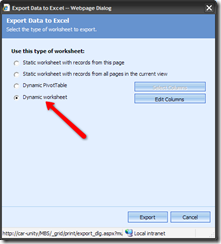
Run the query, and export the results to Excel. Make sure you select "Dynamic Worksheet" although I'm pretty sure "Dynamic Pivot Table" will work image
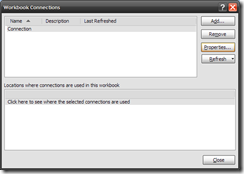
In Excel, once you have data displayed (which might mean enabling data connections), go to the Data tab, and click "Connections" image
You should have a single connection called "Connection". Look the properties for this connection. image
Go to the definition tab. The command text contains the SQL behind the advanced find. image

This approach works with SharePoint lists as well. Using this technique with SharePoint list data helps you quickly determine the GUID of the list and the view you are using.

Update: Dynamics exports the data as an XML file, not a binary XSL file. Therefore, you can simply open the downloaded "Excel" file with a standard text editor and view the SQL within. 

3

Reflections on Marketing Class: Using Apple as a Case Study in Marketing Channels

| Monday, October 27, 2008

Today in my marketing class at Melbourne Business School, we examined distribution channels vis-à-vis marketing. Not surprising, we examined the distribution of music, tracing it from a technological standpoint (vinyl to MP3) and its channels (independent shops to iTunes).

The lecturer's main point with regards to Apple's success was the control over the hardware, software, and content of their "ecosystem" which allows them to control the channels of music distribution. While I don't disagree with Apple's dominant position, I take issue with some of comments and perceptions with regard to Apple's technology approach that were made in passing.

Primarily, the point was made that Apple is successful because their system is "closed", as compared with Microsoft that must struggle to handle software from a multitude of vendors. In fact, the underlying assumption, it seems, was that you simply could not develop any custom software for a Mac. Of course, this is simply not true.

Let me briefly explore the development options for both systems.

Unlike Windows where developers need to spend hundreds of dollars on software development products like Visual Studio, all Macs come bundled with X-Code, their development environment for building Mac software. One could argue that this alone makes it easier for a developer to create software for a Mac compared to a Windows PC.

Of course, it doesn't stop there. There was many who would argue that the Mac development environment is superior to Windows in other respects. The Cocoa framework seems to be a very elegant paradigm for developing applications, and Mac applications can often be created without writing any code. This doesn't mean anyone can create software for a Mac, but it does mean that more software can be created faster with fewer defects. (As an aside, Automator for Mac does mean that some tasks can be automated by someone without any development knowledge, and there simply isn't anything like it on Windows).

Steve Jobs understood the benefits of having a superior development environment (as well as other marketing principles such as segmentation, targeting and positioning) as demonstrated on this now-famous video from when he was at Next:

This philosophy was brought to Apple when they purchased Next, and brought Jobs back into the fold. Mac OS X is based on Next technology.

In class, it was also mentioned that the iPhone is Apple's first device which supports third-party applications. This, too, is not true (although it is the first iPod which can supports third-party applications). The Newton supported application development,although I don't know if it was a good environment or not.

Finally, Apple has success not just on Macs, but also on PCs with their iTunes software, showing they can success even when they don't control the hardware. Microsoft, too, has had success on Macs. Internet Explorer was highly regarded, and Office for Mac is sometimes regarded as superior to its Windows counterpart.

In summary, I'm making the point that Apple computers and devices are not closed systems; they do support software development, and provide a robust environment at that. Steve Jobs not doubt continues to realize the contribution that software developers make to the value proposition of a computing platform.

0

Trying to get Dugg

| Sunday, September 21, 2008

I've recently been experimenting with commenting on Digg postings.

For the uninitiated, Digg is a system where you vote (or digg) Internet pages that you like. For example, if the author if this blog was so-inclined, you might see a "Digg This" button for this post juxtaposed with the number of diggs this post has already received. Each time you Digg a page, the number increases. Having many diggs means your site gets listed on Digg, which generates more traffic for your site and indicates a high level of positive interest.

Digg has a commenting system along the sames lines. You create comments for each Internet page's Digg count. Users then digg comments up or down. A positive rating on a comment means you have more digg-ups than digg-downs. The higher your score, the more people that "digg" your comment.

Digg seems to attract the Internet savvy, and many highly dugg stories relate to

  • movies, especially those that might appeal the comic book loving type or have a cult following
  • politics, with a strong pro-Obama, anti-Bush agenda
  • technology, with constant strife between Apple fanboys, generic Microsoft bashers, and Linux geeks

My experience commenting hasn't been positive. My first comment was dugg down, and the response to comments range from vial to just plain offensive. Subsequent ones followed similar patterns of engendering loathing by Digg readers; it was not uncommon to the word "fuck" in those comments, directed squarely at me. Often, some kind-hearted soles would stick up for me, only to be subjected to further attacks. The Internet is a mean place.

Today, I'm happy to report that Bush (and Cheney) bashing seems to be a sure-fire way to get your comments dugg up. Finally, I have received a positive score on a comment, and even a tongue-in-cheek reply.

I'm really moving up in the world.

0

How to Charge Your Chevy Volt

| Friday, September 19, 2008

Run the electric car by charging it in the lighter of your Hummer

0

The End of ColdFusion

| Thursday, September 18, 2008

The marketing gurus at Adobe have just released an Evangelism Kit for ColdFusion [via Damon Cooper's Blog].

For as long as I've been using ColdFusion (over 3 years), I always heard detractors saying it was a dead or dying product. We never got much help from Adobe (or Macromedia) in justifying ColdFusion; we were forced to speculate on the future of the product, and the number of customers using it. I suspect that Adobe never had the need to justify CF; sales were fine, and so too, most likely, were revenues from the product.

So now I am going to become one of those detractors. Let's just say that this kit hasn't inspired me. On the contrary... I can't but feel that this Evangelism Kit spells the decline of ColdFusion. Here are few things to consider:

  • Why now? 10+ years without such an offering. Why create this document now? I suspect that some of the major clients listed are actually migrating away from CF, so better to indicate that these companies are using CF while it is still technically true.
  • Where are the exciting new features? I mean, look at the roadmap. Sully features "enhancements". I'm surprised "bug fixes" didn't make it onto that list.
  • Open source competition: Blue Dragon, Railo and more
  • Leveraging other products and scripting languages as middleware in the RIA stack: Groovy (the boys at Broadchoice, filled with names synonymous with ColdFusion, are using Groovy more and more these days: 9 posts tagged with "Groovy", zero posts tagged with "ColdFusion"), PHP, and Ruby.

I like ColdFusion, so I hope Adobe can keep it alive and keep its developers highly productive, but just when I think Adobe will push to make CF mainstream, I feel they took at least one step backwards, and may not have any more momentum to move forward.


1

Resume 2.0: Part 1: The Skills Cloud

| Thursday, March 6, 2008
Your resume is boring. That's probably by design. Nothing to be ashamed of there.

These days, resumes are often geared two audiences: the recruiter and the employer. They have different needs and it might be difficult to convey the information best to both parties at the same time. This is not unlike your web site which also has two different audiences, the search indexers and the human browsers. A lot of money has been in trying to keep your web site optimal to both the former and the latter, sometimes with hilarious results.

In this post, I'd like to examine a very simple way to convey information on your resume: your broad skill set. I'll focus on technologies here since I have a resume geared towards a job in the IT sector. Keep in mind that this style is probably better for those in the same boat as it relies on a concept familiar to most technologists (except, perhaps, the team at Blogger): the tag cloud. In the tag cloud, all the tags you used to categorize your posts appear, with tags used more frequently appearing more often. Most blogging engines support this natively.

Let's substitute "blog" for "resume" and "tag" for "skill" where skills with larger fonts are those which I am most skilled/experienced with. What do we have? A "skills cloud" if you will. My looks a little something like this:


Actionscript Ant cfcUnit ColdFusion Coldspring Dojo Toolkit Farcry Groovy Hibernate Java Javascript Jetty jQuery JUnit Mingle MySQL Oracle PHP Prototype Rake Reactor Ruby Rails SharePoint Spring Spry SQL Server Tomcat Transfer YUI


As you can see, it plainly apparent which skills I have and my relative strength in each. A good recruiter would use my employment and education to get a baseline level of a few skills to be understand the relative disparity.

If you wanted to separate your skills based on categories -- on my resume I have a frameworks, database, and programming language sections -- you can color-code your tags where like colors indicate the same category. Of course, most resumes are not printed in color so be careful on this one.
0

Customizing Your Blogger Feed Using Yahoo Pipes

| Tuesday, March 4, 2008
In a previous post, I talked about adding an extra query parameter to your feed so that you can track feed subscriber's behavior in Google Analytics. Some of you may have wondered how to accomplish this if you can't control your feed's formatting. It turns out that this is quite easy to do using a fun and geeky tool called Yahoo Pipes. Here's what my pipe looks like:


This just loops over the link elements in the feed and adds the extra query parameter to it. From there, save your pipe and get the feed URL for it.
2

If You're Not My Facebook Friend, Are You Really My Friend?

| Saturday, March 1, 2008
Dear "Friend,"

We hang out sometimes. Or we work together. I like you. You like me. But if you're not my Facebook friend, we have issues.

You see, if you want to know what I'm up to this weekend, what book I'm reading, or what other friends I'm talking to, you need to see my Facebook profile. Nothing personal, but I have no intention of calling you to invite you out this weekend despite the individual that you are; if you're not in the list of people I can invite to Facebook events, i.e. my Facebook friends, I probably won't invite you. It's not that I don't like you, it's that I'm a busy man. I don't want to look up your e-mail or call you or SMS you. I'm not going to do that because frankly, dear friend, you need a Facebook account.

I want to you, my friend, to know what I'm up to. I want to talk to you about the books I'm reading. I want you to ask me about the New York Times article I thought was interesting.

And I want to know what you're up. If you're someone I lost touch with, changes are I still care how you're doing. Make it easy for me to reconnect. Post something interesting in your status. Help me out. If you're someone I met briefly at party who is now my Facebook friend, let's grow and expand our relationship. Post those pictures, however embarrassing they might be. If I can how you're doing, I'll be sure to ask on your wall. Or if I really like, I might send you a private message. But still, if I really really like you, I might just be old fashioned and send you an SMS. Call me old-fashioned.

So "friend," please, please, please create a Facebook account and be my Facebook friend. It's not creepy or geeky to be Facebook friends with me, even if I barely know. We may have more in common than you know. Write on my wall. Please! And I'll write on yours.

Sincerely,

Facebook Profile #642686356

P.S. If I happen to have asked you out in an ambiguous sort of way via a private Facebook message after briefly meeting you at a party and you weren't quite sure what to do or say, sorry [Amber]. That was probably beyond the limits of acceptable Facebook usage and was a bit lazy. My bad! I'll call you when I'm back from Hawaii (which I planned with the help of some of my Facebook friends) and hopefully you will say yes this time.
0

Tracking the Behaviour of Feed Subscribers Using Google Analytics

| Friday, February 29, 2008

Ever wanted to know which visitors in your Google Analytics were RSS subscribers. This is quite easy to set up if you can control some basic formatting of the item and channel guid element. In this example, we'll simply append an extra query string parameter: ga:source=feed. So, for example, if the URL of your blog post is http://friendofasquid.blogspot.com/2008/02/don-worry-be-happier.html, then in the RSS feed it would be http://friendofasquid.blogspot.com/2008/02/don-worry-be-happier.html?ga:source=feed.

On to Google Analytics. We need to set up an advanced filter for your blog. It looks like this:

image

I've kept the request URI regular express very simple. You can always make it more precise by ensuring it is within the the query string but it's probably more effort than its worth? Make sure you add the filter to a profile, and click finish.

Presto! When you view your sites report, you should a User-Defined value as expected.

image