This blog is now obsolete. Go to scott.arbeitman.id.au for all new content.

1

Melbourne Business School Merger

| Saturday, December 6, 2008
In the wake of an internal restructure this week, The Australian is reporting today that a merger between Melbourne Business School and the University of Melbourne may be imminent with the University likely to vote on a proposal this week:
An in-principle agreement will be put to the university's council on Monday after about three years of talks between university vice-chancellor Glyn Davis and MBS chairman and former BHP boss Ron McNeilly.
As a student and staff member of Melbourne Business School, I have very mixed feelings about any potential merger and I've very unsure how it will affect both the security of my job and the quality of my education. My sense is that the merger is being tailored to satisfy the faculty, without much regard to the professional staff. This is somewhat understandable, as faculty are really the "core" employees of a University.

However, my team at MBS has made a substantial investment in Information Technology over the past year that shouldn't be overlooked and certainly should not be subsumed by what Melburne Uni has. It is my belief that like faculty, information technology can effect the quality of learning, as well as support fundraising and marketing activities that faculty simply cannot.

I'm hoping that professional staff are well consulted and that management understand the potential synergies of merging professional staff, and also the amazing complexity, politically and technologically, or unifying or discarding IT systems.

I'll have more to say on this as more details are released to the public domain.
0

Our Dumb Planet: Summary of the Israel-Arab Conflict

| Wednesday, December 3, 2008

From the Onion's atlas:

The area that makes up Israel was promised to the Jews by both the UN and God, but because the legitimacy and power of both entities is only recognized by a handful of people, the land remains contested.

0

Tagging Tags

| Wednesday, November 26, 2008

I'm a big fan of tagging (folksonomy, as the kids call it), and I've written previously about the need to this be adopted to file systems as quickly as possible. One problem with tagging that comes up is when the existence of one tag implies that others should be applies. For example, "Mac" implies "Apple". This is a formal hierarchy, of course, and that effectively means putting tags in directories: exactly the scenario we want to avoid!

Luckily, the way out of this is simple. Tagging of tags! This follows from our first principle: folders are so 1990's and hierarchies are unnecessarily restrictive. Of course, we wouldn't make a distinction between types of tags; a tag could be applied to another tag or another "entity". So for a post about "Melbourne Business School", I usually use the "melbourne business school" tag. The "melbourne business school" tag should itself be tagged with "university" and "business" and perhaps "study" or "work". Similarly, sometime I write about ColdFusion. ColdFusion should be tagged with "technology", "Adobe" and "software". Potentially, "software" could likewise be tagged with "technology" but that's just fine.

So far, I have only seen this concept applied in one place: Taglocity, an Outlook plug-in, although it is framed slightly differently. I'd like to see more it, especially for blogs.

0

Dynamics CRM 4: Discovering the SQL behind an "Advanced Find"

|

Have you ever wanted to know exactly what SQL was generated by the advanced find? This question might just be because of shear curiosity, but the results of this query by also be the starting point for most sophisticated reports using SQL Server Reporting Services.

The process is straightforward. All you need is Dynamics CRM 4 and Excel 2007 (2003 should work similarly). [See update below for doing this without Excel]

Perform an advanced find  
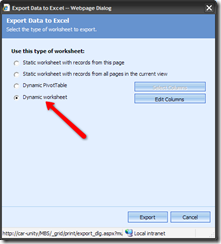
Run the query, and export the results to Excel. Make sure you select "Dynamic Worksheet" although I'm pretty sure "Dynamic Pivot Table" will work image
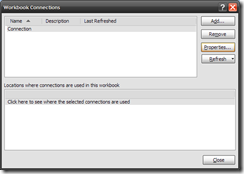
In Excel, once you have data displayed (which might mean enabling data connections), go to the Data tab, and click "Connections" image
You should have a single connection called "Connection". Look the properties for this connection. image
Go to the definition tab. The command text contains the SQL behind the advanced find. image

This approach works with SharePoint lists as well. Using this technique with SharePoint list data helps you quickly determine the GUID of the list and the view you are using.

Update: Dynamics exports the data as an XML file, not a binary XSL file. Therefore, you can simply open the downloaded "Excel" file with a standard text editor and view the SQL within. 

0

Bring it All Together

| Tuesday, November 25, 2008

A couple of weeks ago, I had a go at Joel Spolsky for effectively blaming bad corporate policies on MBA graduates. As a Melbourne Business School student myself, this struck a nerve.

Well it looks like he sorta acknowledges that he often makes claims without any good basis, but that it does make for entertaining reading. I wholeheartedly agree!

Of course, he does that just after he trashes another of my favourite minds, Thomas Friedman. Still, I have to grudgingly accept that he is probably right.


1

78 Means "You're a just a very tiny bit better than average"

| Monday, November 24, 2008

It's official: I'm slightly better than average. But I'm not getting cocky; the difference is not statistically significant. So actually, yeah, I'm probably average. And that's OK.


I have now received my grades for both of my syndicate assignments, which are:

  • Marketing: 78
  • Accounting 78
You might wonder what mark I received last term. I'm not shy. I'll tell you:
  • Managing People for High Performance (MPFHP): 78 (update: my MPFHP mark was actually a 76)
This, of course, is no freakish coincidence. Melbourne Business School grades on a curve, and I'm pretty sure the mean of that curve is 77.

Update: I've been told the mean is actually more like 75, but the gist is the same.

I'll tell you why I love the curve:The curve opens upwondrouspossibilities or learning. You see, when I know that class average must be 77, I don't hesitate to take "hard" classes that I could otherwise avoid. For example, I'm not a fan of accounting, but might try my luck at a whole class on financial statement analysis. Why not? I'm not scared of a 75. And I won't favour an "easy" class like "Leadership" just to boost my GPA. A 79 won't make a difference.

Let me contrast this with McGillwhere I did my undergraduate degree. In McGill, my major -- Computer Science -- was "hard". I can tell it's hard for a number of reasons, but an easy way to tell is that the average mark hovered around a 65, which I think was C or C+. On my transcript, it was not unusual to see a C-, and even once, a D. Without context, this isn't too good. Don't worry, though, I was able to boost slightly my GPA by taking some "easy" classes. Among them:
  • Sexual Ethics
  • International Organization
  • Understanding Planet Earth
  • Space Time and Matter
Unfortunately, I was considerably more restricted in the classes I could take than a average McGill student so my GPA stayed low in absolute terms, although probably slightly higher than average for a computer science student. Still, this low GPA had real implications in finding my first job; a legacy which still haunts me in many respects to this day.

So embrace the curve. Ride it. And enjoy your 78.

3

Crashing Outlook Saga

|

My love affair with Microsoft continues. For the past few months, Outlook 2007 crashes constantly, severely limiting my productivity. Last week, I asked someone from our help desk to look at the problem again. They did the usual:

  • uninstall/reinstall
  • clean my registry

but without any success.

Today, it appears that one of Microsoft's background services detected that there was a problem with outlook (500 crashes later), and decided to try to determine, once and for all, how I could fix my Outlook. (I should note by the way, that while the diagnostic scan was running, Outlook crashed 3 more times).

Here is what the scan discovered:

image 

Clicking "continue" took me to a worthless web page which I will now summarize: we don't know what the problem is and we don't have any solutions.

Can they possibly waste any more of my time?